At the start of the year, we Open Sourced tempo, a temporal TUI client, which has been a huge unlock for us internally in terms of speeding up debugging and at the very least my personal development workflow. This has kicked off a very dangerous game of seeking anywhere and everywhere I can improve tooling/developer experience for our team here at Galaxy. Tempo quickly lead the way for jig, a component library to quickly setup TUI applications with managed state/lifecycle. This has allowed us to quickly iterate and attempt new ideas/tools for the various systems we use in our stack, stay tuned to more blog posts for more in depth talks on the technology we are using and how.
Today we are open sourcing gnat, a TUI client that has been extremely useful for monitoring our event driven systems that run on NATS. gnat helps you monitor NATs/Jetstream instances with dashboard metrics, live message monitoring, key/value and object store management, custom command system and many more.
Before I get into the features, let’s give a small blurb about what NATs is for some precursor knowledge: at its core, NATS is a lightweight event system for building distributed, event-driven services. Producers publish messages to subjects (think topic names), and any number of consumers can subscribe and react in real time — no direct coupling, no hard dependencies. With JetStream layered on top, you also get durable streams, replay, and consumer state so events can be persisted and processed reliably even when services restart or fall behind. Pretty cool stuff, it’s often compared to Kafka as a similar offering.
gnat Features
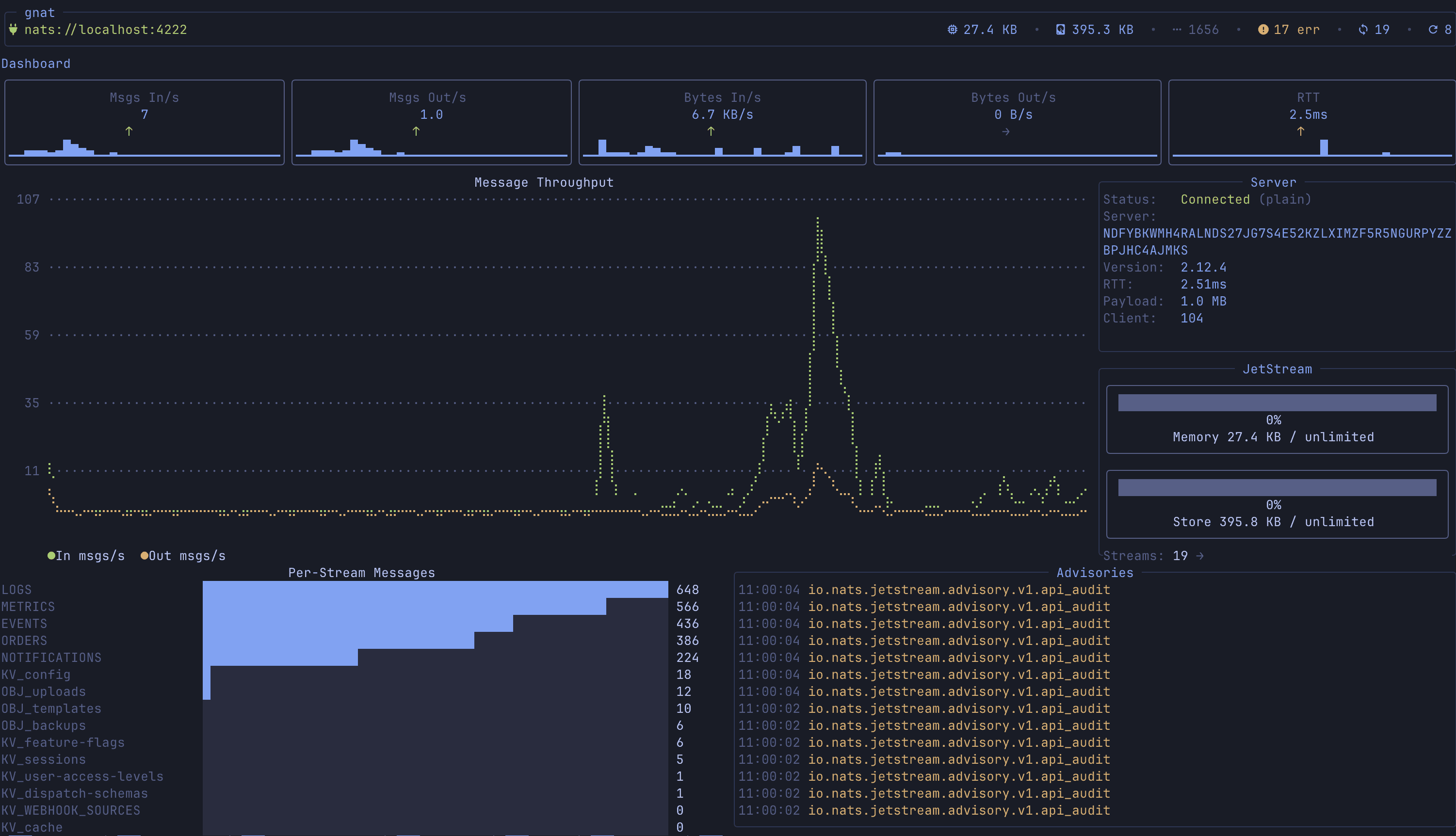
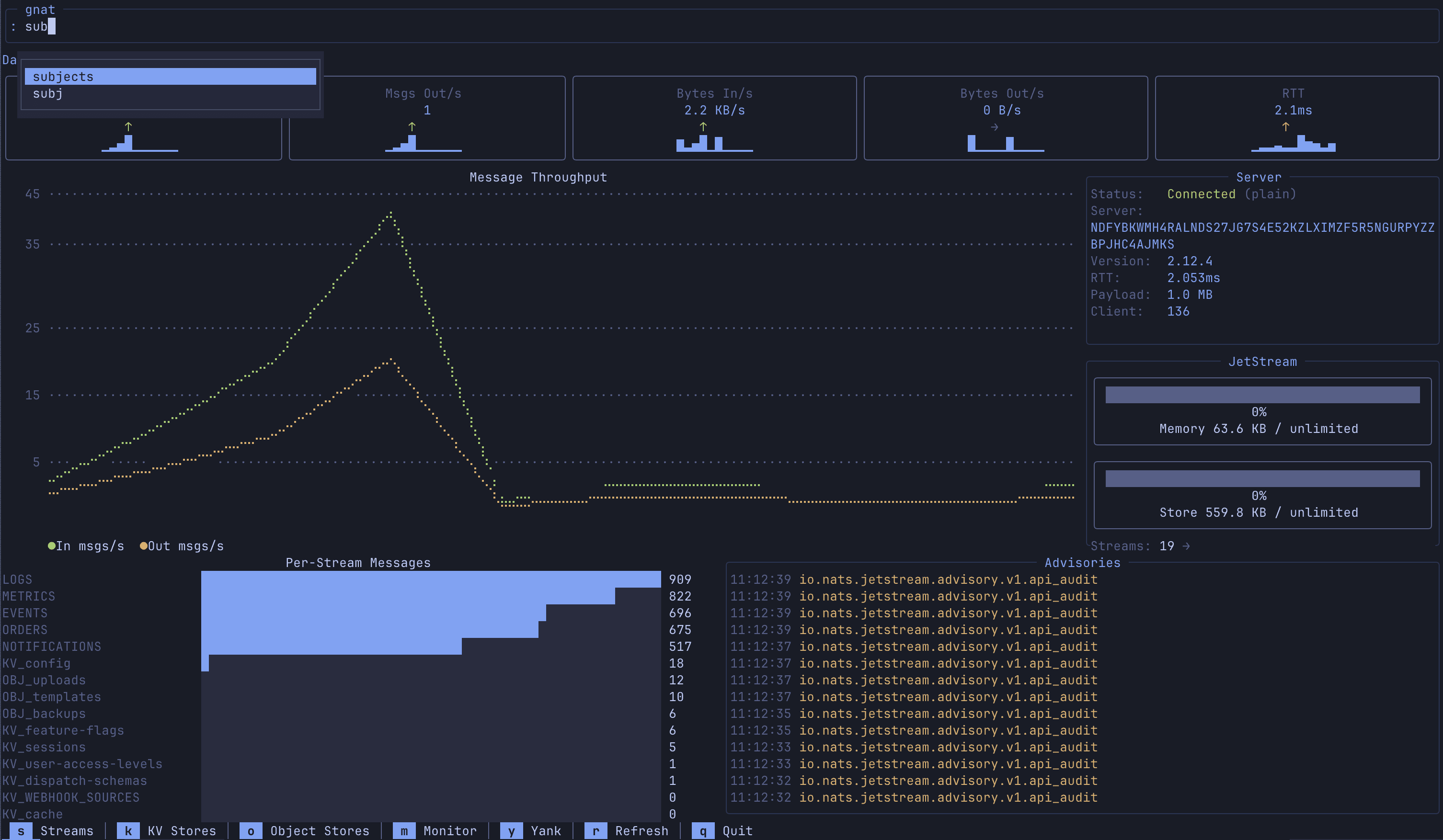
Dashboard & Real-Time Metrics
Overview of your NATS deployment at a glance — message rates, byte throughput, API calls, server info, account limits, and server errors
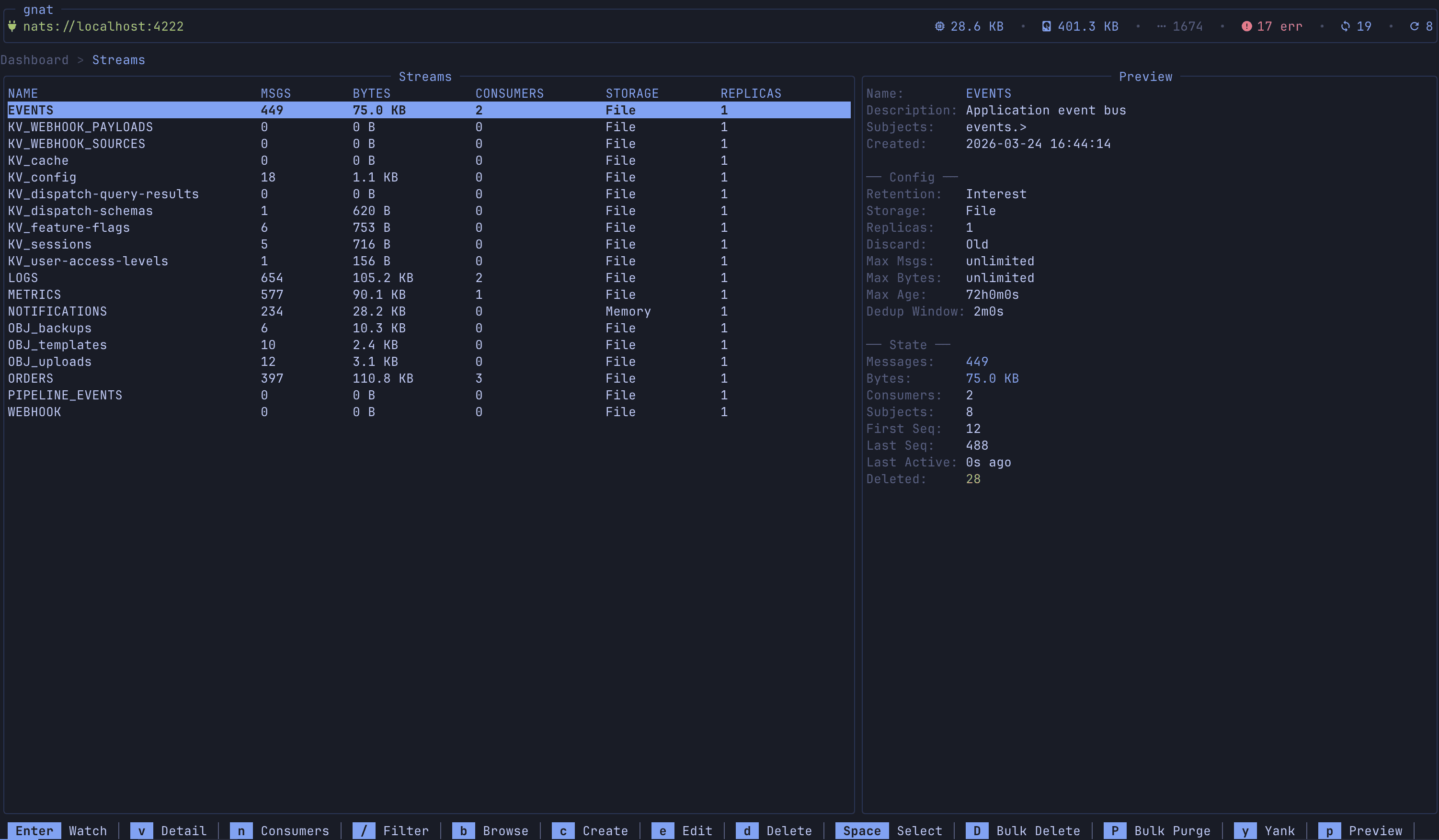
Stream Management
Full CRUD for JetStream streams — browse, create, edit, delete, purge, and import from JSON. The list view shows message counts, storage type, replication, and live growth rates (msg/s, bytes/s)
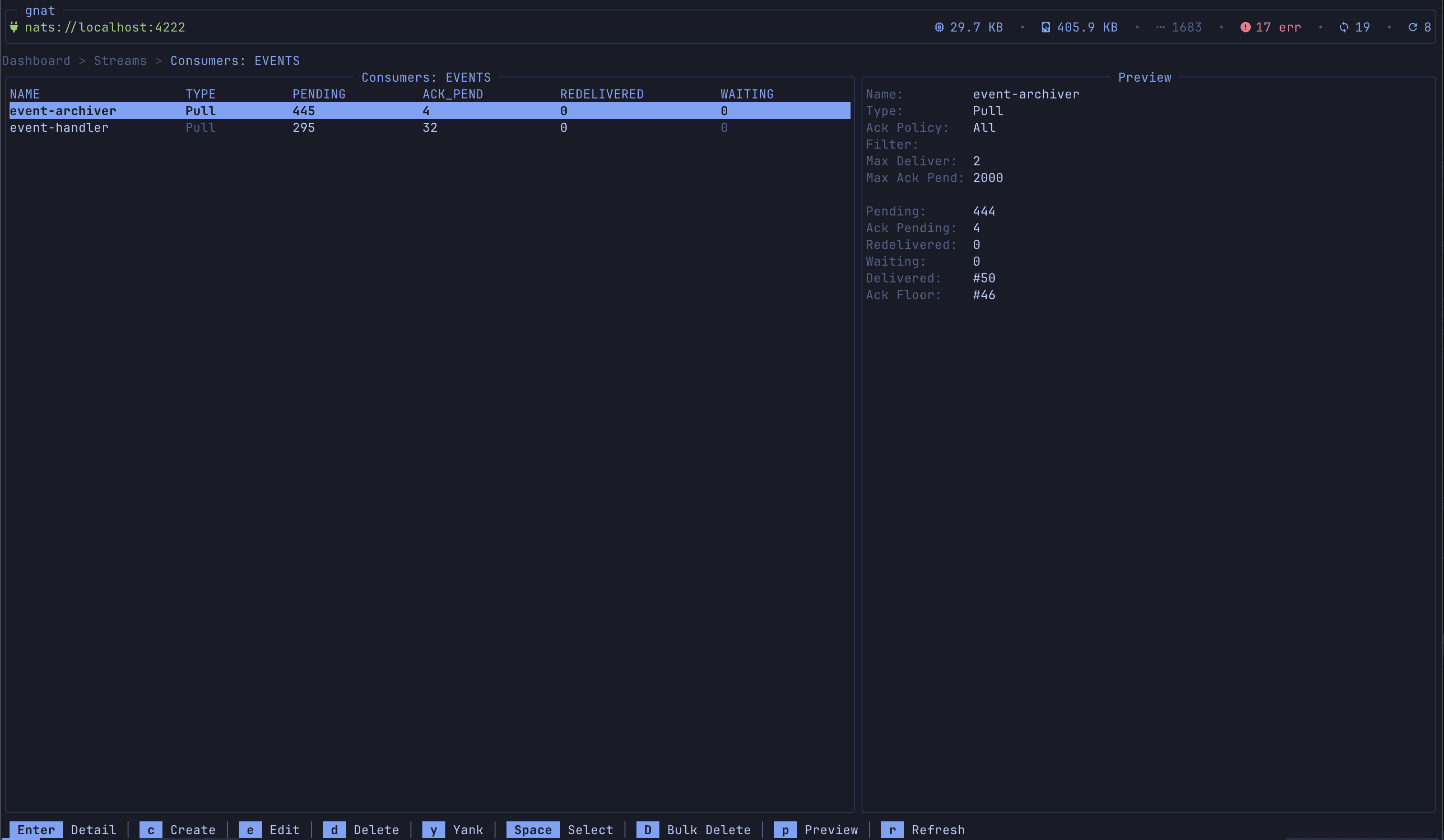
Consumer Management & Lag Dashboard
Browse consumers per stream, create/edit/delete, and inspect delivery state. The dedicated consumer lag dashboard aggregates lag across all streams with pending counts, ack tracking, processing rates, and redelivery metrics.
Message Monitor (Live Watch)
Real-time message subscription with support for both JetStream and NATS core. Subscribe to any subject, watch messages flow in, pause/resume, and toggle between delivery policies (all, last, new).

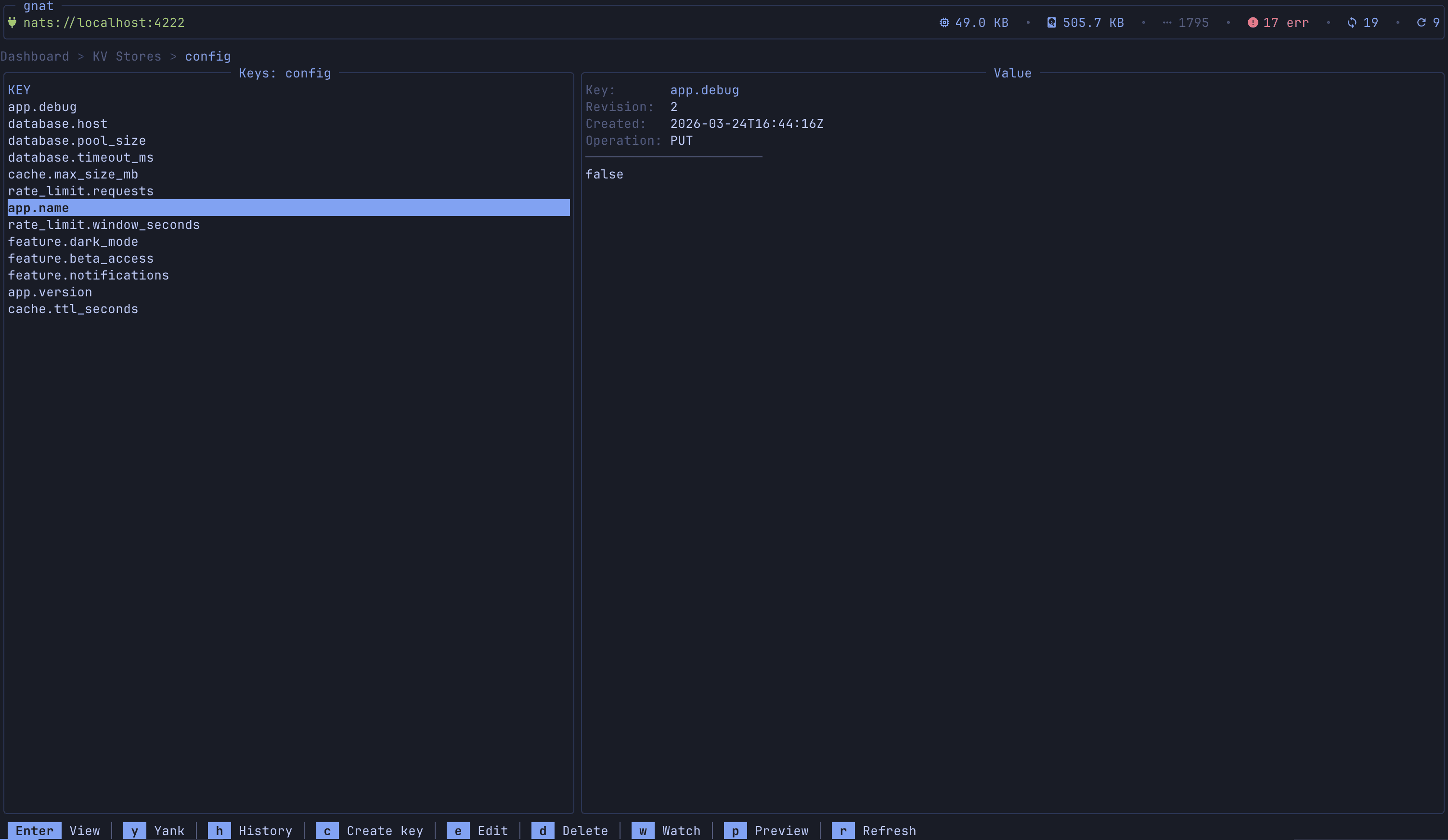
Key-Value Store Management
Browse KV buckets, list keys with revision numbers, get/put/delete values, and a live KV Watch mode that streams changes (PUT/DELETE operations) in real time with timestamps and revision tracking.
Object Store Management
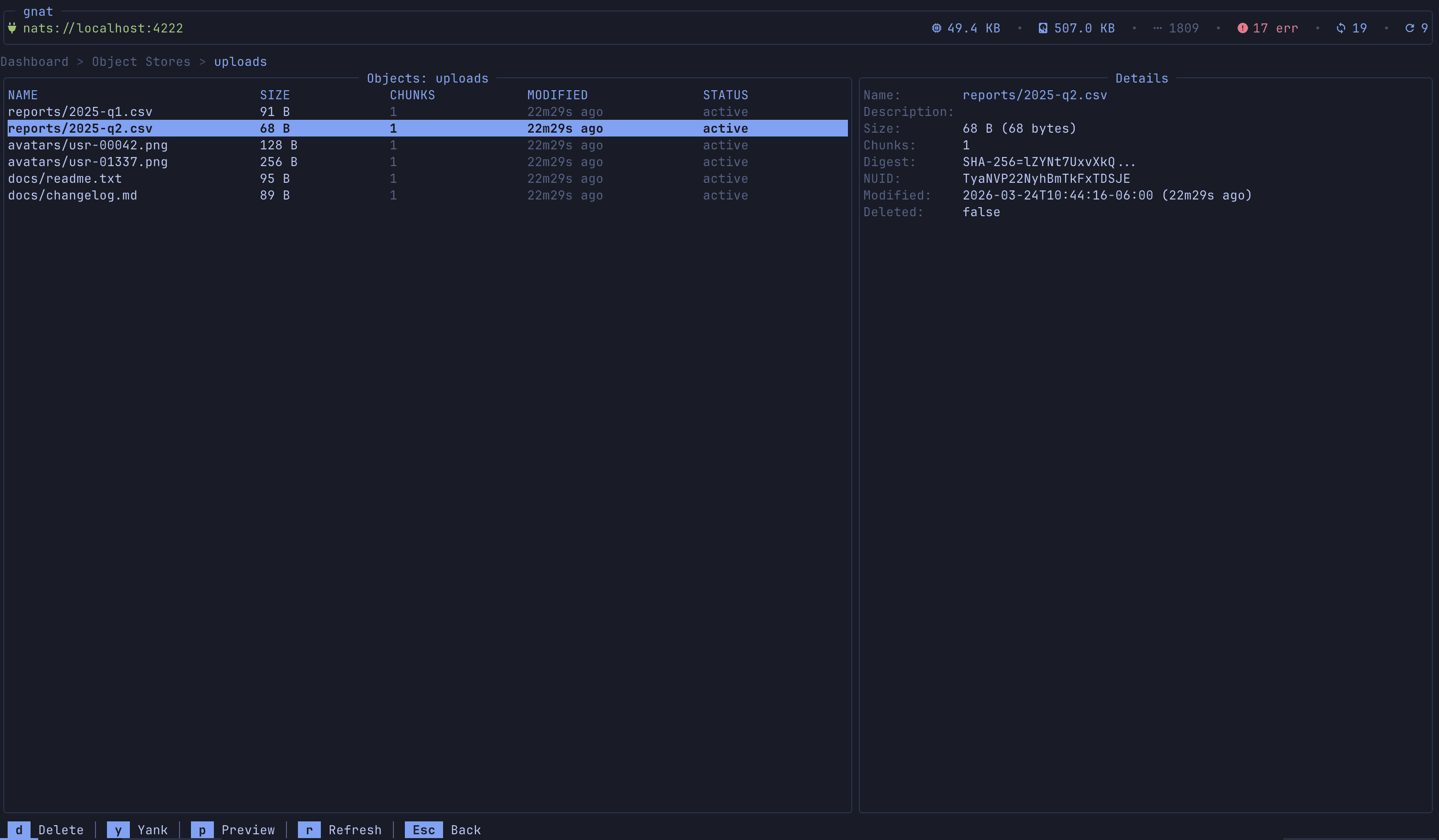
Browse object store buckets, upload/download/delete objects, and inspect metadata (size, replication, sealed status).
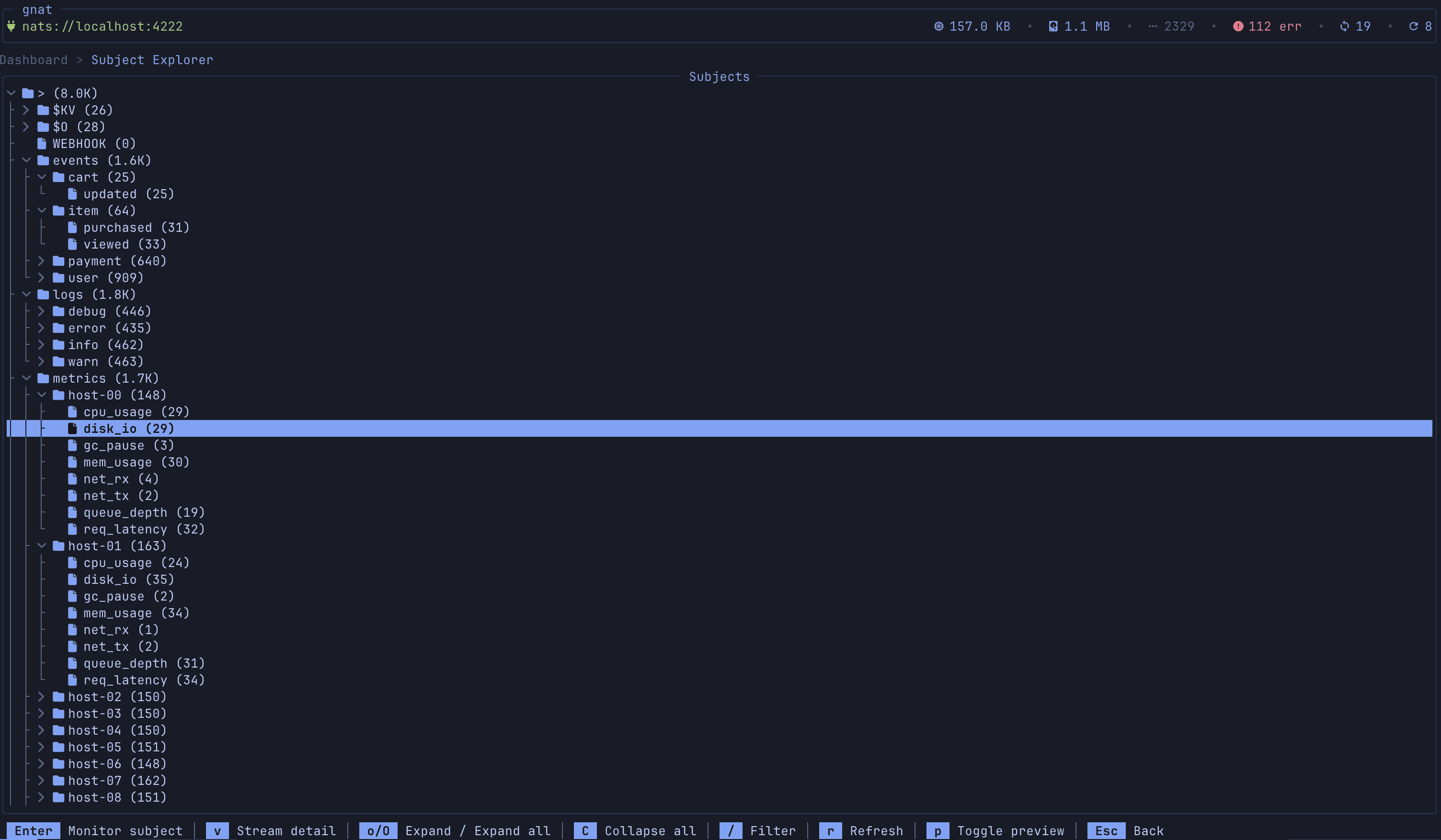
Subject Explorer
Hierarchical tree view of all subjects across streams with message counts and stream associations. Click any subject to jump directly to the message monitor.
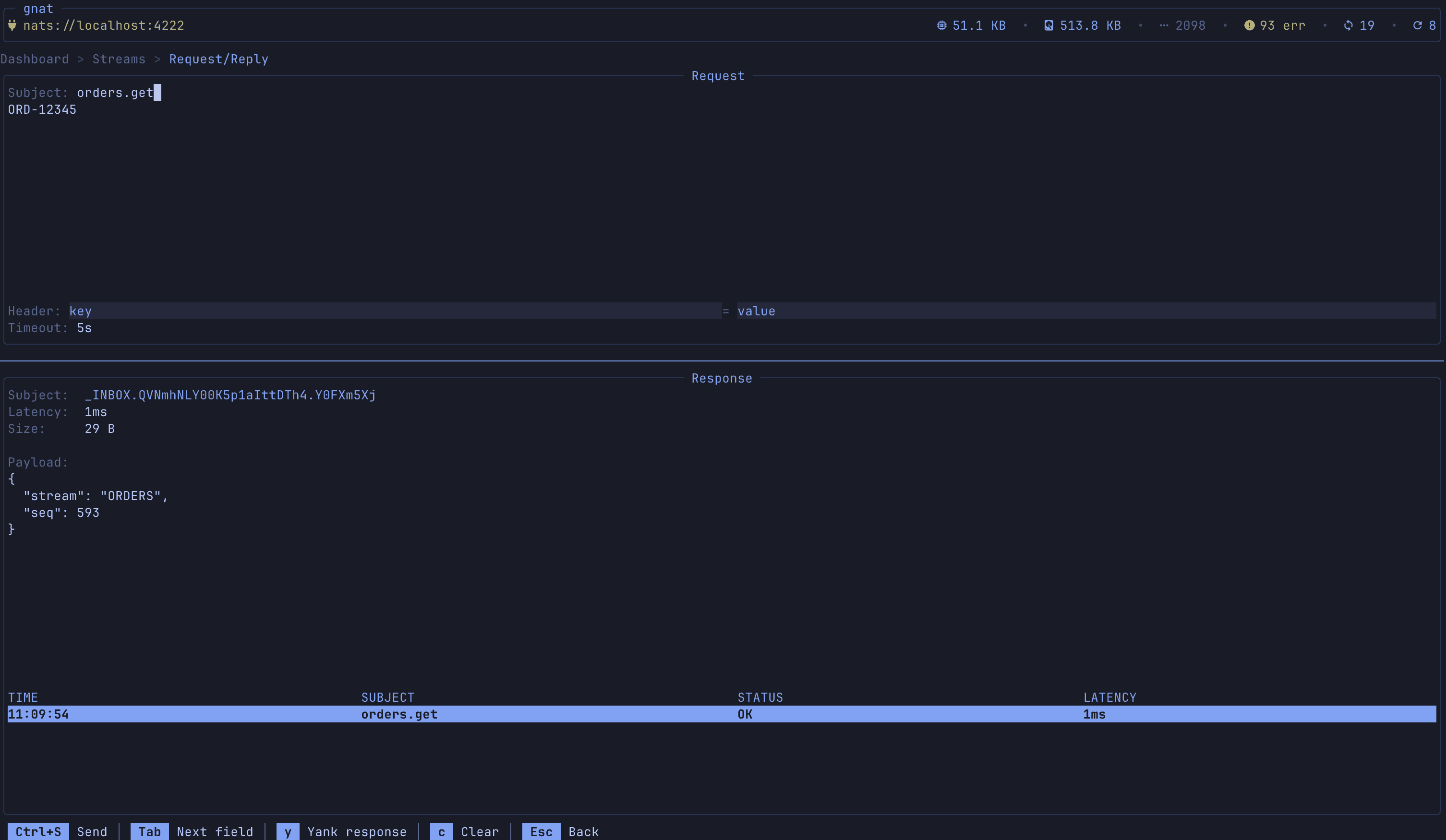
Request/Reply Tester
Interactive request/reply playground with subject input, payload editor, custom headers, configurable timeout, and a response viewer that shows latency. Keeps a history of requests with timestamps.
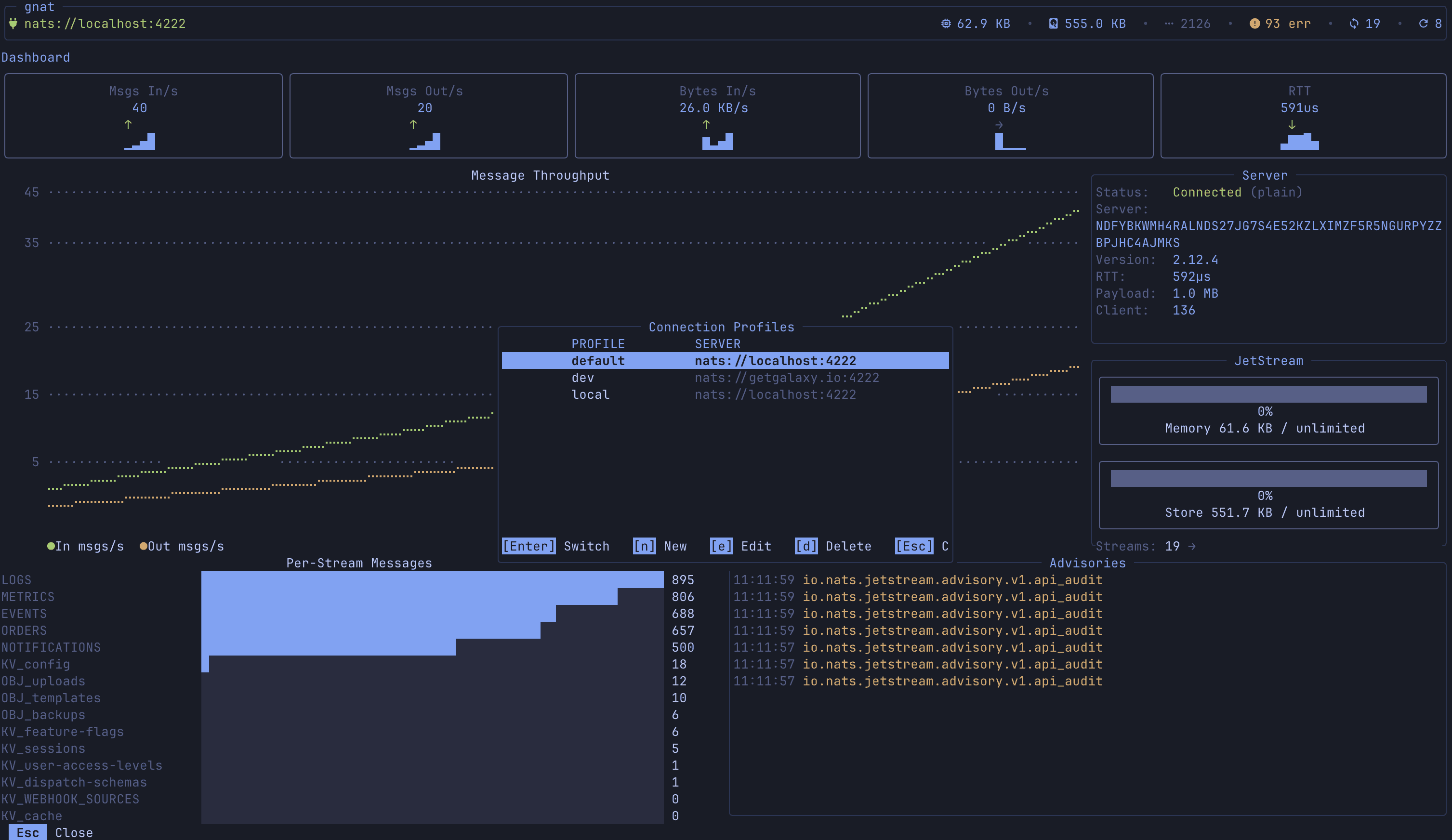
Connection Profiles & Auth
Named connection profiles with support for credentials files, tokens, user/password, NKey seeds, and full TLS/mTLS. Environment variable expansion ($NATS_TOKEN) keeps secrets out of config files. Hot-swap profiles with P.
Command Bar & Custom Commands
: opens a command bar with tab completion. Built-in commands for navigation (:streams, :monitor, :dashboard, etc.) plus user-defined commands in config with template variables ({stream}, {consumer}, {subject}) and configurable output modes to be able to customize you TUI experience.
Bookmarks
Save frequently accessed resources (streams, consumers, KV buckets) with B and jump back to them from the bookmarks list. Persistent across sessions.

With all that in mind, let’s go ahead and get gnat setup locally.
Install
Install via golang:
go install github.com/galaxy-io/gnat/cmd/gnat@latest
Install via homebrew:
brew install galaxy-io/tap/gnat
Configure
gnat is configured via a config file in ~/.config/gnat/config.yaml (or wherever $XDG_CONFIG is). Here is an example:
theme: tokyonight-night
active_profile: local
profiles:
local:
url: nats:
staging:
url: nats:
credentials: $HOME/.nkeys/staging.creds
domain: staging-js
production:
url: nats:
credentials: $HOME/.nkeys/prod.creds
domain: prod-js
tls:
cert: /etc/nats/tls/client-cert.pem
key: /etc/nats/tls/client-key.pem
ca: /etc/nats/tls/ca.pem
server_name: nats.prod.example.com
skip_verify: false
# Profile-specific commands (override global ones with same name)
commands:
backup-stream:
description: "Backup a stream to file"
cmd: "nats stream backup {stream} /tmp/{stream}-backup"
confirm: true
consumer-reset:
description: "Reset consumer to beginning"
cmd: "nats consumer edit {stream} {consumer} --deliver-policy=all"
confirm: true
token-auth:
url: nats:
token: $NATS_TOKEN
userpass-auth:
url: nats:
user: admin
password: $NATS_PASSWORD
nkey-auth:
url: nats:
nkey: $HOME/.nkeys/user.nk
# Global commands (available in all profiles)
commands:
stream-info:
description: "Show detailed stream info"
cmd: "nats stream info {stream}"
output: json
stream-report:
description: "Stream report across all streams"
cmd: "nats stream report"
output: log
consumer-info:
description: "Show consumer details"
cmd: "nats consumer info {stream} {consumer}"
output: json
purge-stream:
description: "Purge all messages from a stream"
cmd: "nats stream purge {stream} -f"
output: log
confirm: true
pub-test:
description: "Publish a test message"
cmd: "nats pub {subject} 'hello from gnat'"
output: log
kv-dump:
description: "Dump all keys in a bucket"
cmd: "nats kv ls {bucket}"
output: log
server-check:
description: "Check server health"
cmd: "nats server check connection"
output: log theme: tokyonight-night
active_profile: local
profiles:
local:
url: nats:
staging:
url: nats:
credentials: $HOME/.nkeys/staging.creds
domain: staging-js
production:
url: nats:
credentials: $HOME/.nkeys/prod.creds
domain: prod-js
tls:
cert: /etc/nats/tls/client-cert.pem
key: /etc/nats/tls/client-key.pem
ca: /etc/nats/tls/ca.pem
server_name: nats.prod.example.com
skip_verify: false
# Profile-specific commands (override global ones with same name)
commands:
backup-stream:
description: "Backup a stream to file"
cmd: "nats stream backup {stream} /tmp/{stream}-backup"
confirm: true
consumer-reset:
description: "Reset consumer to beginning"
cmd: "nats consumer edit {stream} {consumer} --deliver-policy=all"
confirm: true
token-auth:
url: nats:
token: $NATS_TOKEN
userpass-auth:
url: nats:
user: admin
password: $NATS_PASSWORD
nkey-auth:
url: nats:
nkey: $HOME/.nkeys/user.nk
# Global commands (available in all profiles)
commands:
stream-info:
description: "Show detailed stream info"
cmd: "nats stream info {stream}"
output: json
stream-report:
description: "Stream report across all streams"
cmd: "nats stream report"
output: log
consumer-info:
description: "Show consumer details"
cmd: "nats consumer info {stream} {consumer}"
output: json
purge-stream:
description: "Purge all messages from a stream"
cmd: "nats stream purge {stream} -f"
output: log
confirm: true
pub-test:
description: "Publish a test message"
cmd: "nats pub {subject} 'hello from gnat'"
output: log
kv-dump:
description: "Dump all keys in a bucket"
cmd: "nats kv ls {bucket}"
output: log
server-check:
description: "Check server health"
cmd: "nats server check connection"
output: log theme: tokyonight-night
active_profile: local
profiles:
local:
url: nats:
staging:
url: nats:
credentials: $HOME/.nkeys/staging.creds
domain: staging-js
production:
url: nats:
credentials: $HOME/.nkeys/prod.creds
domain: prod-js
tls:
cert: /etc/nats/tls/client-cert.pem
key: /etc/nats/tls/client-key.pem
ca: /etc/nats/tls/ca.pem
server_name: nats.prod.example.com
skip_verify: false
# Profile-specific commands (override global ones with same name)
commands:
backup-stream:
description: "Backup a stream to file"
cmd: "nats stream backup {stream} /tmp/{stream}-backup"
confirm: true
consumer-reset:
description: "Reset consumer to beginning"
cmd: "nats consumer edit {stream} {consumer} --deliver-policy=all"
confirm: true
token-auth:
url: nats:
token: $NATS_TOKEN
userpass-auth:
url: nats:
user: admin
password: $NATS_PASSWORD
nkey-auth:
url: nats:
nkey: $HOME/.nkeys/user.nk
# Global commands (available in all profiles)
commands:
stream-info:
description: "Show detailed stream info"
cmd: "nats stream info {stream}"
output: json
stream-report:
description: "Stream report across all streams"
cmd: "nats stream report"
output: log
consumer-info:
description: "Show consumer details"
cmd: "nats consumer info {stream} {consumer}"
output: json
purge-stream:
description: "Purge all messages from a stream"
cmd: "nats stream purge {stream} -f"
output: log
confirm: true
pub-test:
description: "Publish a test message"
cmd: "nats pub {subject} 'hello from gnat'"
output: log
kv-dump:
description: "Dump all keys in a bucket"
cmd: "nats kv ls {bucket}"
output: log
server-check:
description: "Check server health"
cmd: "nats server check connection"
output: log theme: tokyonight-night
active_profile: local
profiles:
local:
url: nats:
staging:
url: nats:
credentials: $HOME/.nkeys/staging.creds
domain: staging-js
production:
url: nats:
credentials: $HOME/.nkeys/prod.creds
domain: prod-js
tls:
cert: /etc/nats/tls/client-cert.pem
key: /etc/nats/tls/client-key.pem
ca: /etc/nats/tls/ca.pem
server_name: nats.prod.example.com
skip_verify: false
# Profile-specific commands (override global ones with same name)
commands:
backup-stream:
description: "Backup a stream to file"
cmd: "nats stream backup {stream} /tmp/{stream}-backup"
confirm: true
consumer-reset:
description: "Reset consumer to beginning"
cmd: "nats consumer edit {stream} {consumer} --deliver-policy=all"
confirm: true
token-auth:
url: nats:
token: $NATS_TOKEN
userpass-auth:
url: nats:
user: admin
password: $NATS_PASSWORD
nkey-auth:
url: nats:
nkey: $HOME/.nkeys/user.nk
# Global commands (available in all profiles)
commands:
stream-info:
description: "Show detailed stream info"
cmd: "nats stream info {stream}"
output: json
stream-report:
description: "Stream report across all streams"
cmd: "nats stream report"
output: log
consumer-info:
description: "Show consumer details"
cmd: "nats consumer info {stream} {consumer}"
output: json
purge-stream:
description: "Purge all messages from a stream"
cmd: "nats stream purge {stream} -f"
output: log
confirm: true
pub-test:
description: "Publish a test message"
cmd: "nats pub {subject} 'hello from gnat'"
output: log
kv-dump:
description: "Dump all keys in a bucket"
cmd: "nats kv ls {bucket}"
output: log
server-check:
description: "Check server health"
cmd: "nats server check connection"
output: logThere are a few sections to note here:
profile: This is where your NATS connections are stored with relative information for authorization as well including user & pass, nkey, and certs
commands: A powerful feature in gnat that allows users to define custom commands with context aware inputs. In the example above, if you have selected a kv bucket and type :kv-dump it will replace the {bucket} with the selection. These commands will also have auto complete in the command bar.
This should be all you need to get up and running. Below are details to seed demo data if you need. Stay tuned for more to come on how we are utilizing NATS inside of Galaxy in future blog posts.
Test Data Seeding
Once you are all configured, simply run gnat and you’re off. As always if you don’t have a NATs instance readily available, the repo provides a seeder for test data to play around with.
Golang 1.21+
NATS server (installed or via docker)
First, clone the repo.
In a separate terminal, run the seeder with --live. It will continue running until you quit, sending events at variable intervals as well as handling consumer responses for request/reply testing.
cd gnat
go run cmd/seeder --live
cd gnat
go run cmd/seeder --live
cd gnat
go run cmd/seeder --live
cd gnat
go run cmd/seeder --live
Finally, running gnat with the localhost:4222 profile will connect to this seeded instance for a fun playground to mess with.
Issues & Contributions
This project is now fully OSS but has largely been used as an internal tool for our small team. There are likely many more features you might request or more information to be surfaced. Please feel free to report any issues/feedback/feature requests to the gnat GitHub issues page. If you are reporting bugs, we ask that you include the system information from the debug menu, accessible through ! at any point in the TUI. There are keybinds on this view to copy debug information.
Thank you to https://nats.io/ for an awesome open source platform/community that allows for tools like this to be built.